Your electricity bill just went up, and you're eyeing your desktop as the likely reason. Maybe you're building a new PC and need to size a power supply correctly instead of guessing. Either way, guessing wastes money and risks an underpowered PSU. This guide breaks down exact wattage figures for every computer type and activity, plus a simple calculator so you know precisely what your setup costs to run.
Table of Contents
- Quick Answer: Average Computer Power Consumption
- Computer Wattage by Device Type
- How Much Power Does a Computer Use in Different Activities?
- What Affects a Computer's Power Consumption?
- Desktop vs. Laptop: Which Uses More Watts?
- How to Calculate Your Computer's Electricity Usage
- Computer Power Consumption Calculator
- How to Reduce Computer Power Consumption
- Conclusion
- Frequently Asked Questions
Quick Answer: Average Computer Power Consumption
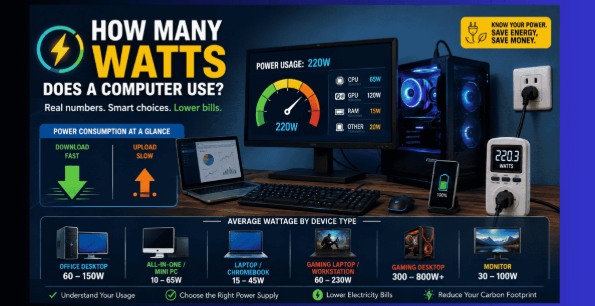
This is the concise version: the average consumption rate for most regular desktops is in the range of 60-300 watts, but laptops only consume 15-45 watts. However, high-end gaming systems and workstations can go up much higher, even exceeding 500 watts in some cases. This entirely depends on your system configuration.
Typical wattage for a desktop computer
The average desktop power consumption of the computer is in the 60 to 150 watt range when surfing, typing and watching media. This rises to 150 to 300 watts when you multitask and do image editing. Adding a graphic processing unit will shift the range once more upwards because a third of power is used by the GPU alone.
Typical wattage for a laptop
Because laptops are designed based on their batteries' capabilities, they use less energy than desktop computers. A normal laptop consumes 15 to 30 watts of power for basic operations such as web browsing or office applications, but it goes up to 30 to 45 watts when doing something heavy like video conferencing. Even the hardest work done by a typical laptop will not exceed 60 watts.
Typical wattage for a gaming PC
Gaming changes the math completely. A budget gaming desktop draws roughly 300 to 500 watts during play, a mid-range rig lands between 400 and 550 watts, and a high-end build with a flagship graphics card can top 600 to 800 watts. Extreme setups running multiple GPUs occasionally spike past 1,000 watts.
Does a monitor increase computer power use?
Yes, and it's easy to forget when you're only counting the tower or laptop body. A single 24 to 27 inch LED monitor adds 30 to 60 watts, while a large 32 inch 4K display can pull 60 to 100 watts on its own. Run two monitors and you've effectively added a second small appliance to your desk.
Computer Wattage by Device Type
Not every computer is built the same, so wattage varies a lot by category. Here's how the main device types stack up against each other.
Office and home desktop computers
Everyday desktops built for browsing, spreadsheets, and streaming typically draw 60 to 150 watts active, with idle sitting closer to 20 to 50 watts. These machines usually skip a dedicated graphics card, relying instead on integrated graphics that sip very little extra power. A 400 to 500 watt power supply comfortably covers this kind of build with room to spare.
All-in-one computers and mini PCs
All-in-ones and mini PCs pack the whole system into a slim shell, and that compact design keeps power draw low. Most mini PCs use just 10 to 65 watts total, including the display in an all-in-one unit. They're a smart pick if lowering your electricity usage matters as much as desk space.
Standard laptops and Chromebooks
Chromebook and regular laptop are by far the most energy-efficient computing devices on the list. Average power usage lies within the range of 15 and 45 watts; however, light Chromebook can use less than 20 watts of power due to simple hardware and compact battery. Screen brightness level makes a huge difference.
Gaming laptops and workstations
Gaming laptops contain high-end computer hardware in a portable form, which results in a much higher wattage than what is seen in an average laptop. 60 to 150 watts can be expected for gaming in simpler games, but that increases to 130 to 230 watts if the discrete graphics card is being used fully.
High-performance gaming desktops
Enthusiast gaming desktops built around a flagship CPU and GPU pair routinely draw 500 to 800 watts under heavy load. Multi-GPU or heavily overclocked builds can exceed 1,000 watts, which is why these systems often need an 850 watt or larger power supply. It's the highest wattage category on this entire list.
How Much Power Does a Computer Use in Different Activities?
The task you're running matters just as much as the hardware itself. Here's what different activities typically cost in watts.
Power use when the computer is idle
A sleeping desktop system, which means a machine that is powered up but not performing any function at the moment, consumes between 20 and 50 watts in recent computers. However, older systems and those systems equipped with an inactive graphics card will consume about 80 to 100 watts. Mobile devices consume less electricity at standby, from 5 to 15 watts.
Power use for browsing, emails, and office work
Productive light tasks are the least strenuous types of activities that you can perform. A PC will require 60 to 150 watts for web surfing, email writing, and typing, while a notebook requires only 15 to 30 watts for these types of tasks. There is nothing strenuous in this type of tasking, so the value remains almost constant.
Power use for video streaming and video calls
Streaming video and running video calls push slightly harder than basic browsing, since the processor is decoding video and a webcam is often active too. Desktops typically land between 70 and 130 watts, and laptops sit around 20 to 35 watts. Higher resolution streams and larger monitors nudge these figures upward.
Power use for photo editing and programming
Creative and development work asks more of your CPU and, if you use one, your GPU. Photo editing and compiling code on a desktop usually pulls 100 to 200 watts, while a laptop climbs to 30 to 55 watts during the same tasks. Rendering large files or running virtual machines pushes both figures toward their upper end.
Power use while gaming or rendering videos
Gaming and video rendering are the two heaviest everyday workloads a computer handles. A gaming desktop commonly draws 300 to 600 watts mid-session, and video rendering can hold that level for hours at a stretch. Gaming laptops climb to 100 to 230 watts under the same kind of load, still well below a comparable desktop.
Sleep mode versus shutdown power consumption
In sleep mode, enough energy is used to allow quick waking up, which is between 2 to 10 watts for a desktop computer and 1 to 2 watts for a laptop. A turned off computer with a power cord will consume energy amounting to 1 to 5 watts to be able to function with Wake on LAN and charge the USB devices.
What Affects a Computer's Power Consumption?
Wattage isn't random. A handful of specific factors decide where your machine lands on the scale.
CPU and graphics card power draw
Your processor and graphics card are almost always the two biggest consumers in the whole system. A typical desktop CPU draws 65 to 150 watts, and overclocked or high core count chips can exceed 200 watts. A high-end graphics card can add another 200 to 450 watts on its own, which explains why gaming PCs sit so much higher than office machines.
Monitor size, brightness, and multiple displays
The size of the screen, its resolution, and its brightness significantly impact the electricity consumed by the computer monitor. The power consumption can be as low as 20 watts for an average monitor, but in case of bright 32 inch 4K monitor, it will rise beyond 90 watts. Even using two or three monitors will significantly increase power consumption.
Storage drives, RAM, cooling, and accessories
Individual components add up even though none of them draw huge amounts on their own. An SSD uses under 3 watts, a traditional hard drive uses 6 to 9 watts, and each RAM stick adds 2 to 6 watts. Fans, RGB lighting, and liquid cooling pumps typically contribute another 10 to 20 watts combined, small individually but noticeable together.
Computer age and energy efficiency
Older hardware tends to waste more power relative to the work it actually completes. A desktop that's five to ten years old can draw noticeably more at idle than a modern equivalent, simply because newer chips include better power management. Upgrading aging hardware often lowers your electricity usage even if your daily habits stay exactly the same.
Power supply efficiency and power loss
Your power supply unit (PSU) converts wall electricity into the DC power your components actually use, and that conversion always loses some energy as heat. An 80 PLUS certified PSU guarantees at least 80 percent efficiency at typical loads, while Gold, Platinum, and Titanium tiers push that figure toward 90 to 94 percent. A cheap, inefficient PSU can waste 15 to 20 percent of every watt you pay for.
Desktop vs. Laptop: Which Uses More Watts?
This is the comparison most people actually care about, so let's settle it directly.
Why laptops generally use less electricity
Laptops are engineered from the ground up around battery life, which forces every component to be smaller and more power conscious. Mobile processors, integrated graphics, and low-power displays all combine to keep total draw a fraction of a desktop's. That efficiency is the entire reason a laptop battery can last all day on a single charge.
When a desktop may be more power-efficient
Desktops aren't automatically the less efficient choice, especially per unit of performance delivered. A well-built desktop doing heavy rendering or number crunching can finish a task faster than a laptop, using less total energy even at a higher wattage. For sustained, demanding workloads, raw desktop performance sometimes wins on efficiency despite the higher instant draw.
Laptop and desktop wattage comparison table
| Activity | Laptop | Desktop |
|---|---|---|
| Idle | 5 to 15W | 20 to 50W |
| Browsing / office work | 15 to 30W | 60 to 150W |
| Streaming / video calls | 20 to 35W | 70 to 130W |
| Gaming | 60 to 230W | 300 to 600W |
| Sleep mode | 1 to 2W | 2 to 10W |
How to Calculate Your Computer's Electricity Usage
Once you know your wattage, the math to find actual cost is refreshingly simple.
Convert watts into kilowatt-hours
Electricity bills are measured in kilowatt-hours, not watts, so you need one quick conversion. Multiply your device's wattage by the hours used, then divide by 1,000. A 150 watt desktop running for 4 hours uses 0.6 kilowatt-hours that day.
Calculate daily, monthly, and yearly electricity use
Once you have your daily kilowatt-hour figure, scaling it up is just multiplication. Multiply by 30 for a rough monthly total, or by 365 for a yearly one. That same 150 watt desktop running 4 hours daily lands around 18 kWh a month and 219 kWh a year.
Estimate the cost of running your computer
Multiply your kilowatt-hours by your local electricity rate to get a dollar figure. The national average residential rate in the United States sits around 18 to 19 cents per kWh as of 2026, according to the U.S. Energy Information Administration, though it ranges from about 12 cents in cheaper states to over 50 cents in Hawaii. Check a recent bill for your exact rate before relying on the average.
Use a plug-in power meter for accurate results
Estimates only get you so far, since real components rarely match their advertised specs exactly. A plug-in power meter, sometimes called a Kill A Watt style meter, measures actual draw at the outlet for twenty to thirty dollars. It's the single most reliable way to know precisely what any device, computer included, is really costing you.
Computer Power Consumption Calculator
Here are three worked examples using the formula above, so you can plug in your own numbers with confidence. For quick damage calculations, you can also use our DPS Calculator.
Example: electricity cost of a 100-watt desktop
Running a 100 watt desktop for 6 hours a day uses 0.6 kWh daily. At an 18 cent rate, that's roughly $3.30 a month and about $40 a year. Bump usage to 10 hours a day and the yearly cost rises to around $66.
Example: electricity cost of a 50-watt laptop
A 50 watt laptop running 6 hours a day uses just 0.3 kWh daily, translating to about $1.65 a month and roughly $20 a year. Even doubling that to 12 hours daily only pushes the annual cost to around $40, which shows exactly why laptops are the cheaper option to run.
Example: electricity cost of a gaming PC
A gaming PC drawing 450 watts during a 3 hour daily session uses 1.35 kWh a day, or about $7.45 a month and $91 a year for that session alone. Add a few more idle hours and light browsing time, and a heavy daily gamer can expect $120 to $150 a year in total computer electricity costs.
How to Reduce Computer Power Consumption
Small habit changes add up fast, and none of these require new hardware.
Turn on sleep mode and automatic display timeout
Set your display to turn off after 5 to 10 minutes of inactivity and your whole system to sleep after 15 to 20 minutes. This single change alone can cut idle-hour electricity use by more than 90 percent. Most operating systems bury this in power or energy settings, and it takes under a minute to configure.
Reduce monitor brightness and disconnect unused screens
Dropping brightness from 100 percent to around 70 percent lowers a monitor's draw noticeably without hurting visibility in most rooms. Unplugging a second or third monitor you're not actively using removes that wattage from your total instantly. It's the fastest, zero-cost change on this entire list.
Choose energy-efficient computer components
When you're buying or upgrading, look for an 80 PLUS Gold or Platinum rated power supply and an ENERGY STAR certified monitor or all-in-one. These certifications exist specifically to flag hardware that wastes less power converting or displaying electricity. The upfront cost difference is usually small compared to years of lower bills.
Close unnecessary apps and background processes
Browser tabs, sync clients, and background updaters all keep your CPU slightly busier than it needs to be. Closing what you're not using lets your processor drop into lower power states more often throughout the day. It's a minor change per session, but it compounds noticeably over months of daily use.
Shut down or unplug devices when not in use
Sleep mode is efficient, but a full shutdown uses even less, and unplugging removes the last trickle of phantom load entirely. If you're stepping away for a day or more, shutting down and unplugging is worth the extra ten seconds. For short breaks, sleep mode still offers the best balance of savings and convenience.
Conclusion
Wattage always comes down to two things: what hardware you're running and how hard you're running it. A laptop checking email might use less power in a day than a gaming desktop uses in twenty minutes, and that gap only grows as workloads get more demanding.
The good news is that you don't need to guess anymore. Match your device type and activity to the ranges in this guide, run the numbers through the calculator formula above, or use our DPS Calculator for quick calculations.
Whether you're sizing a new power supply, budgeting your electricity bill, or just satisfying curiosity, you now have real numbers to work with instead of a guess.
Frequently Asked Questions
How many watts does a computer use per hour?
Most desktops use 60 to 300 watts per hour depending on the task, while laptops use 15 to 70 watts per hour. Gaming and rendering push desktops toward 300 to 600 watts per hour.
How many watts does a computer use per day?
A typical desktop used for 8 hours daily consumes roughly 0.5 to 2.4 kWh a day, depending on workload. A laptop used the same amount typically lands between 0.15 and 0.5 kWh a day.
Is a 500W power supply always using 500 watts?
No, 500 watts is only the maximum output the power supply can deliver, not what it constantly draws. Your actual draw depends entirely on the components installed and what they're doing at any given moment.
How many solar panels are needed to run a computer?
A typical desktop with a monitor uses roughly 1.5 to 4 kWh a day, which needs about one to three standard 400 watt solar panels under good sun conditions. A gaming PC or workstation needs two to three times that many panels to cover the same hours of use.
Does leaving a computer on all day use a lot of electricity?
It adds up more than most people expect, especially if sleep mode isn't enabled. Leaving a 100 watt desktop running 24 hours a day can cost $50 to $65 a year just in idle and light use, compared to $15 to $20 a year if it slept whenever you stepped away.