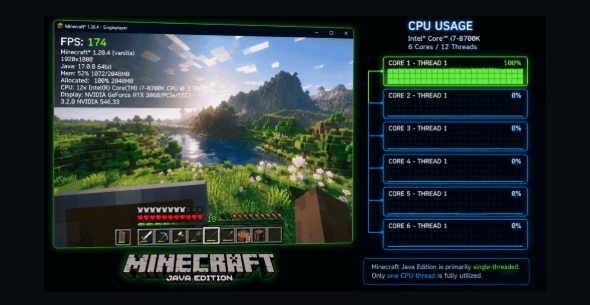
Your Minecraft world stutters. Chunks load late. Your friend runs 200+ Frame Rate on the same hardware. Sounds familiar? Here's the fix. This guide covers every setting, mod, and tweak on how to gain FPS in Minecraft.
Why Minecraft Destroys Your FPS: The Java Problem
Minecraft Java Edition runs on a single thread. One CPU core handles everything. Your other cores sit idle. This kills your Frame Rate fast. Faster single-core CPU speed beats more cores every time.
Real numbers prove it. A Ryzen 7 9800X3D hits 577 FPS in vanilla. A Ryzen 5 2600 only reaches 100 Frame Rate. Twin GPU, completely different results. Single core speed and cache size make all the difference.
Optimize Your PC for Minecraft
Pre-Game System Optimization Checklist
Your system needs preparation before you touch any in-game setting. Start with a GPU driver update first. Outdated drivers cause random stutters.
Download directly from NVIDIA or AMD. Never use Windows Update for drivers. Then switch your Windows Power Plan to High Performance. Balanced mode throttles your CPU speed silently.
Force javaw.exe to your dedicated GPU next. Open Windows Graphics Settings and set it to High Performance. Laptops especially default to integrated graphics for Java. Close Task Manager resource hogs too. Kill Chrome, Discord, and background apps. Free CPU and RAM give Minecraft room to breathe properly.
Best Minecraft Video & Graphics Settings for FPS
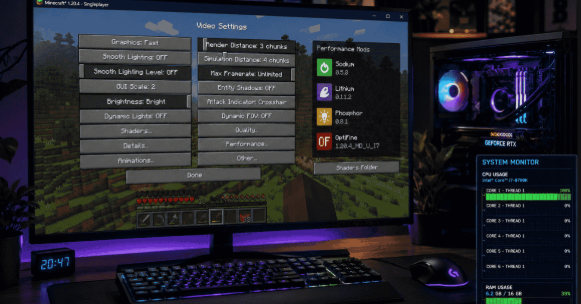
Performance Mods: OptiFine vs Sodium
OptiFine
OptiFine mod doubles your vanilla FPS. It includes built-in shader support, a zoom key, and connected textures. However, it updates slowly and breaks many mods. Sodium mod outperforms it easily today.
Sodium
Sodium mod destroys vanilla Frame Rate limits completely. It delivers 3–5x performance gains through a full rendering engine rewrite. It runs on the Fabric mod loader and works perfectly with other mods too.
RAM Allocation & JVM Arguments
Giving Minecraft too much RAM actually hurts performance. The G1 garbage collector scans all allocated memory periodically.
More memory means longer scans. Longer scans cause massive stutters. Smart RAM allocation Minecraft beats maximum allocation every single time.
Stick to the sweet spot always. Vanilla Minecraft runs perfectly on 2 to 4GB. Lightly modded setups need 4 to 6GB. Heavy modpacks cap at 8GB. Never exceed 50% of your total system RAM ever.
How Much RAM to Allocate
| Setup | RAM Amount |
|---|---|
| Vanilla Minecraft | 2 to 4GB |
| Sodium mod + few mods | 4 to 6GB |
| Heavy Modpacks | 8GB |
Advanced JVM Arguments for Smooth Gameplay
These JVM arguments reduce garbage collection Java pauses. They won't raise your maximum FPS. But they eliminate annoying mid-game stutters completely.
Step 1: Open Minecraft Launcher → Installations → Edit profile
Step 2: Click More Options → Find Xmx argument field
Step 3: Replace -Xmx2G with -Xmx4G for 4GB
Monitoring Your Frame Rate
Press F3 to show FPS in Minecraft instantly. This is how to see FPS in Minecraft — just press F3. Now you know how to see your FPS in Minecraft anytime. Change one setting at a time. Check Frames Per Second again after each change. This tells you exactly what helps.
Third-party software gives deeper data for Minecraft Bedrock Edition. Track average FPS and frame time together. Smooth frame times matter as much as raw Frames Per Second. A locked 60 FPS beats a jumpy 90 every time.
Improve Your Connection to Minecraft Servers
Lag and low FPS come from different places entirely. Low FPS is a hardware problem. Lag is a network problem. Use Ethernet for stable, low-latency gaming. Enable Quality of Service (QoS) on your router. This prioritizes Minecraft traffic over everything else automatically.
Frequently Asked Questions
What Minecraft Settings Affect FPS the Most?
Render distance chunks and simulation distance hit hardest. After that, smooth lighting off and graphics settings Fast give the biggest gains.
Should I Use OptiFine or Sodium for Better FPS?
Sodium mod wins every time for pure performance. It delivers 3–5x vanilla Frames Per Second versus OptiFine mod's roughly 2x.
How Much RAM Should I Allocate to Minecraft?
Vanilla Minecraft runs perfectly on 2–4GB. Never exceed 50% of your total system RAM ever.
Why is Minecraft CPU Intensive Instead of GPU?
Minecraft Java Edition runs everything on a single CPU thread. Your GPU only gets stressed heavily with Iris shaders installed.
What's the Best Render Distance for Performance?
Stay between 2–8 render distance chunks always. Doubling it quadruples your CPU and GPU load instantly.
How to get 700 FPS in Minecraft?
Install Sodium mod on Fabric mod loader with a fast single-core CPU. Drop render distance chunks to 2–4 and disable smooth lighting off.
How to get 1000+ FPS in Minecraft?
You need a Ryzen 7 9800X3D or equivalent fast single-core CPU. Combine Sodium mod, Lithium, and minimum video settings together.
How to enable 120 FPS in Minecraft?
Turn VSync off and set Max Framerate to Unlimited. Install Sodium mod and lower render distance chunks to 8.
Is 10,000 FPS possible?
No normal hardware reaches 10,000 FPS in Minecraft Java Edition. Even top-end single
Written by
PerfCalcPro