Your crosshair overshoots every head you flick toward. Then your wrist runs out of mousepad halfway through a turn. Both problems trace back to one number.
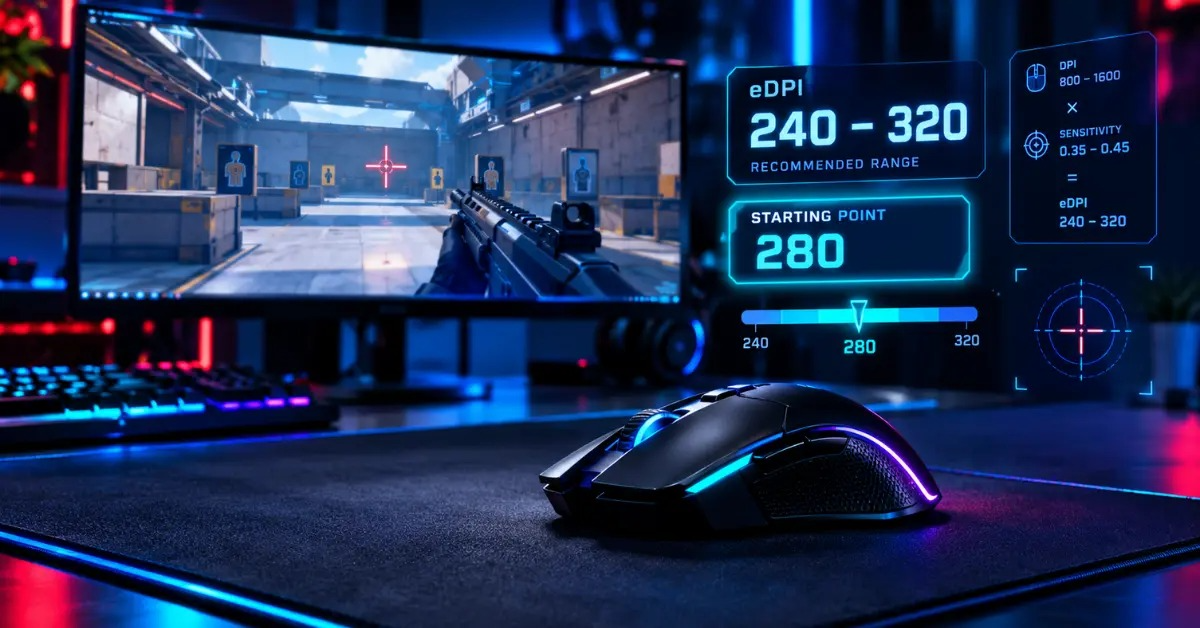
The best eDPI for Valorant sits between 240 and 320 for most players, and 280 is the safest first test. Pick it, then adjust in small steps until flicks feel routine.
Quick answer: Start at 280 eDPI, which means 800 DPI at 0.35 or 1600 DPI at 0.175. Stay inside 240 to 320 until your aim settles.
What Is the Best eDPI for Valorant?
Start with 280 eDPI, which equals 800 DPI at 0.35 in-game sensitivity. For most players, the best eDPI for Valorant falls between 240 and 320. That range gives you enough speed to clear close angles and enough control to land precise crosshair placement.
However, no single number works for every hand. eDPI multiplies your mouse DPI by your sensitivity, so it measures how fast your view turns. Think of it as a speedometer: two mice can differ inside, yet the dial shows the same speed. Treat 280 as the first test on the road to the best eDPI for Valorant, not a verdict.
Five Easy Settings That Equal 280 eDPI
Every row below turns your view the same distance. Pick the DPI your mouse already runs.
| Mouse DPI | In-game sensitivity | eDPI |
|---|---|---|
| 400 | 0.70 | 280 |
| 800 | 0.35 | 280 |
| 1000 | 0.28 | 280 |
| 1600 | 0.175 | 280 |
| 2000 | 0.14 | 280 |
How to Calculate eDPI in Valorant
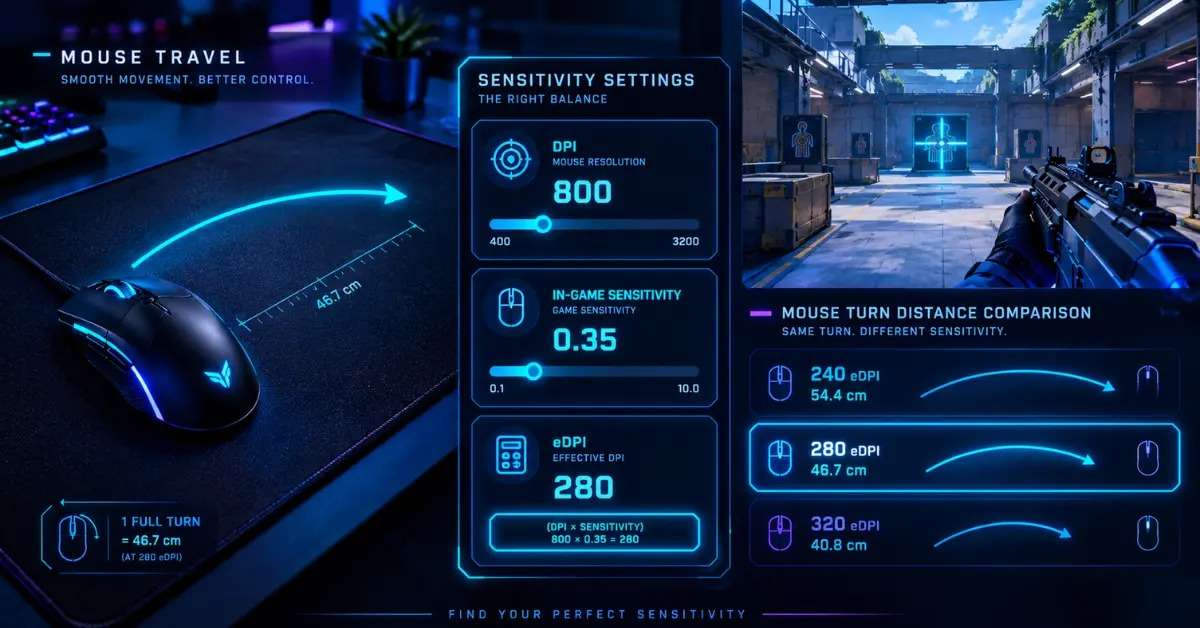
Multiply your DPI by your in-game sensitivity, and you have your eDPI. At 800 DPI with 0.35 sensitivity, that equals 280. To work backwards, divide your target eDPI by your DPI, so 280 divided by 1600 gives 0.175.
Why bother with all the maths? Because DPI alone tells you nothing about turn speed. The eDPI Calculator handles any DPI you run, and the What Is eDPI? guide explains the idea in more depth. Finding the best eDPI for Valorant starts with knowing your current number.
What 240 to 320 eDPI Feels Like in cm/360
Physical distance beats raw numbers, so convert eDPI into cm/360, the mouse travel needed for one full turn. CSDB lists Valorant's yaw as 0.07, which gives the formula 13,063 divided by eDPI. Therefore, 240 eDPI needs about 54.4 cm, 280 needs 46.7 cm, and 320 needs 40.8 cm.
800 DPI vs 1600 DPI: Which Works Better?
Neither DPI changes the best eDPI for Valorant on its own. 800 DPI at 0.35 and 1600 DPI at 0.175 both equal 280 eDPI, so your turn distance stays identical. The difference shows up on your desktop, where a 1600 DPI cursor moves faster.
ProSettings lists both 800 DPI and 1600 DPI setups across its pro database, so neither choice is wrong. Pick whichever feels normal outside the game, then hit your target eDPI. If you're unsure what your mouse really runs, the DPI Analyzer checks it in seconds.
Best Valorant Sensitivity for 800 DPI
Set your 800 DPI sensitivity between 0.30 and 0.40 to stay inside the best eDPI for Valorant window. That band equals 240 to 320 eDPI. Start at 0.35, play a full session, and move by 0.01 or 0.02 only after you spot a repeatable problem. That patience stops the common trap of chasing a new number after every lost duel.
Best Valorant Sensitivity for 1600 DPI
Stick to a 1600 DPI sensitivity of 0.15 to 0.20 to reach the same best eDPI for Valorant window. Never carry your old 800 DPI number across unchanged, because that doubles your turn speed instantly. Halve the in-game value whenever you double your DPI.
Best eDPI for Valorant: What Pros Actually Use
Here's the catch with copying pros: their numbers keep moving. Strafe cited a ProSettings report in 2025 that put the average pro eDPI at 261 across 424 setups. Other public trackers report similar figures, yet none can name the best eDPI for Valorant for your hand.
Individual pros adjust their setups too. Sportskeeda listed aspas at 800 DPI and 0.40 sensitivity in 2024, which equals 320 eDPI. However, bo3.gg later tracked a shift to 296. Check a live tracker before you copy anyone's pro player settings.
Average Pro eDPI vs Your Starting Point
Treat the average pro eDPI as context, not a shortcut to the best eDPI for Valorant. A median eDPI shrugs off outliers, while an average gets dragged toward them. Your 240 to 320 starting range contains the 261 figure, so you stay near pro territory with room to turn.
Low vs High Sensitivity: Which Style Fits You?
Low sensitivity rewards steady arm aim, and the right sensitivity for headshots usually leans lower. However, you need generous mousepad space to turn around without lifting your mouse.
High sensitivity favors quick turns, so you clear close corners fast. Meanwhile, small hand shakes grow bigger on screen, which can hurt aim accuracy at range. Most players find the best eDPI for Valorant in the middle band, then nudge toward their comfort zone.
| eDPI band | cm/360 | Typical feel |
|---|---|---|
| 200 to 240 | 54 to 65 cm | Slow and steady |
| 240 to 320 | 41 to 54 cm | Balanced |
| 320 to 400 | 33 to 41 cm | Fast and twitchy |
How to Find Your Best eDPI for Valorant
Feel decides your sensitivity, not a chart. Set your DPI, start at 280 eDPI, and test on the Range before you queue. Place your crosshair beside a bot's head and flick onto it. Repeated overshoots mean your sensitivity runs high, while repeated short flicks mean it runs low.
Moreover, check your 180-degree mouse turn from the center of your pad. One comfortable swipe should rotate you about halfway around without lifting early. If it can't, raise sensitivity slightly, and if your crosshair trembles during tiny corrections, lower it.
Five-Step Sensitivity Test
- Lock your DPI first and leave it alone while you test.
- Open Settings, choose General, scroll to Mouse, and enter 0.35 at 800 DPI or 0.175 at 1600 DPI.
- Practice flick shots and micro adjustments on Range bots for ten minutes.
- Play two Deathmatch rounds and watch your first correction, not your score.
- Adjust by about five percent at a time, then stop once you've found your best eDPI for Valorant.
How to Fix Overflicking in Valorant
Overflicking usually means your sensitivity runs too high or your wrist and arm fight for control. Lower sensitivity by five percent first, since the best eDPI for Valorant rarely needs a big jump. Then slow your flick and stop your hand the moment the crosshair reaches the head.
ADS and Scoped Sensitivity Multiplier Settings
Keep both multipliers at 1.0 for your first test. The ADS sensitivity multiplier controls weapons that zoom when you aim down sights. The scoped sensitivity multiplier controls sniper scopes such as the Operator. Lock in the best eDPI for Valorant first, because multipliers only scale that foundation.
A lower value can help if long-range corrections feel twitchy. Sportskeeda's 2024 aspas profile shows 1.0 for both multipliers, so the default has pro backing. Change one multiplier at a time.
Should Raw Input Buffer Be On in Valorant?
Turn it on for most setups. Riot added Raw Input Buffer in patch 3.07, according to ONE Esports, and it reads raw mouse input more directly. The biggest gains appear on mice with very high polling rates.
Still, no setting replaces the best eDPI for Valorant for your hand. If your frame rate drops or the mouse feels odd, test the option on and off under the same conditions. The Polling Rate Test shows what your mouse actually reports.
How to Convert CS2 Sensitivity to Valorant
Players coming from CS2 or Apex Legends can keep their DPI and still find the best eDPI for Valorant quickly. Multiply your CS2 sensitivity by 0.3143, the ratio of the two yaw values, to land at the same turn distance. CSDB lists 0.022 for CS2 and 0.07 for Valorant.
For example, 1.0 sensitivity at 800 DPI in CS2 becomes about 0.314 in Valorant, which equals 251 eDPI. Any reliable Valorant sensitivity converter will confirm that result. Then test it in Valorant itself, because field of view and target size change how the same distance feels.
Final Thoughts
Starting at 280 eDPI gives you a clear base. From there, the best eDPI for Valorant moves inside 240 to 320 as your aim settles. That range balances quick turns with steady control. Remember, though, that your hand has the final vote.
Small steps and a fixed routine win here. Treat your mouse sensitivity settings like an experiment. Lock your DPI, change one value by five percent, and judge it over a full session. Consistent aim settings beat a perfect number you swap every week.
Plug your numbers into the eDPI Calculator, confirm your real DPI with the DPI Analyzer, and head to the Range. Your best eDPI for Valorant is the one you can repeat under pressure. Then give that setting a full week before you judge it.